Vocal Pocket
Manual · version 0.1
Makes a pocket for the vocal in the music. In each third-octave band from 200 Hz to 8 kHz where the vocal is sounding and the music is too close to it, the music is turned down in that band, only as much as needed and only while the vocal is there. When the vocal stops, the music comes back. Zero latency.
Where it goes
On the music bus, or any bus that is not the vocal. In the Side Chain menu at the top of the plugin window, pick the vocal. Key it from the dry vocal, or from a vocal bus before the effects. A reverb or delay return on the side chain counts as vocal, and the pocket would then stay open after the singer stops.
The bypass is plain, not level-matched. The effect is the music getting a little quieter where the vocal is, and a level-matched bypass would hide it. A stereo bus at 48 kHz uses about 1 to 1.5 % of one core.
Controls
| Control | What it does |
|---|---|
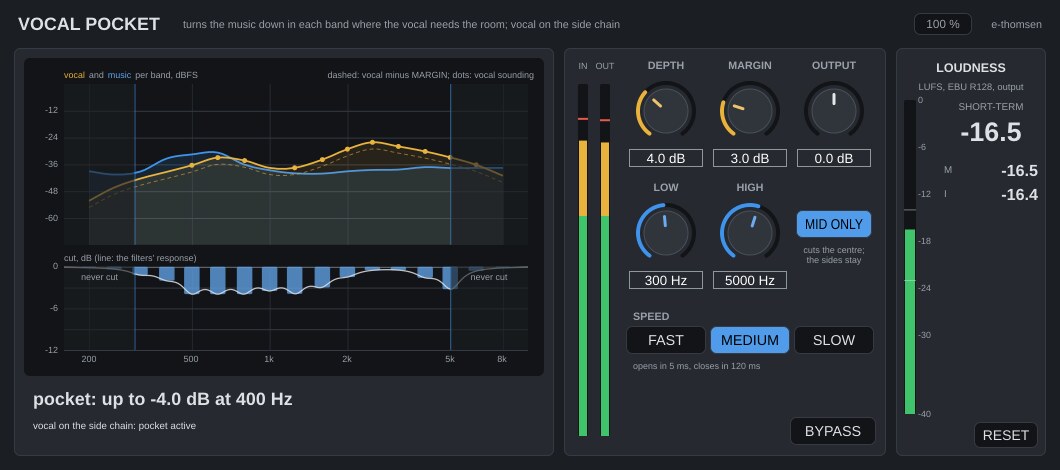
| DEPTH | 0 to 12 dB, default 4. The most any band is turned down. 2 to 4 dB is usually enough to hear the vocal come forward without hearing the music duck. |
| MARGIN | 0 to 12 dB, default 3. How far the vocal should sit above the music in each band. A band is cut when the music is above the vocal's level minus MARGIN, by the difference, up to DEPTH. With the music 1 dB under the vocal and MARGIN 3, that band is cut by 2 dB. With the vocal 20 dB under the music it is cut by the full DEPTH. With the vocal more than MARGIN above the music nothing happens. |
| LOW, HIGH | LOW 100 Hz to 1 kHz, default 300 Hz. HIGH 2 to 10 kHz, default 5 kHz. Bands outside this range are never cut. The defaults leave the bass and the air alone. |
| SPEED | FAST, MEDIUM or SLOW, default MEDIUM. How fast the pocket opens and closes: 3 ms and 60 ms, 5 ms and 120 ms, 10 ms and 250 ms. The first figure is the time the cut takes to get there, the second the time a full cut takes to come back under 0.5 dB after the vocal stops. Slow sounds smoothest on sustained vocals and pads; Fast follows a rap or a staccato line. |
| MID ONLY | On by default. The cut is applied to the centre of the stereo image only, and what is panned out passes untouched. The detection listens to the centre too. In mono the full cut is there. Off: left and right are cut alike, and the detection listens to both. Switching fades over 20 ms. |
| OUTPUT | -12 to +12 dB, default 0. |
| BYPASS | Plain, with a 20 ms fade. |
The display
At the top, the level per band of the vocal (amber) and the music (blue) in dBFS, with the vocal minus MARGIN as a dashed amber line. Where the blue curve is above the dashed line, that band is cut. A dot on the vocal curve marks a band where the vocal is sounding. At the bottom, the cut per band as bars hanging down from 0 dB (scale 0 to -12 dB), with the real response of the filters as a white line. The range outside LOW and HIGH is shaded.
Under the display, the deepest cut right now, for example "pocket: up to -3.2 dB at 2.5 kHz", held for half a second so it can be read, and the status: "vocal on the side chain: pocket active", "no side chain: connect the vocal" or "vocal silent: no cuts". IN and OUT peak meters, and the loudness panel measures the output.
Working with it
- Put it on the music bus with the vocal on the side chain and play the chorus. Start at DEPTH 4, MARGIN 3 and MEDIUM.
- Toggle BYPASS. The vocal should step forward, and the music should not sound quieter, only clearer around the vocal.
- If it is not enough, raise MARGIN first, since the vocal is asking for more room, then DEPTH.
- If the music audibly breathes with the vocal, lower DEPTH or go to SLOW.
- If the cuts land on the low mids and make the track thin, raise LOW to 400 or 500 Hz.
- Leave MID ONLY on unless the guitars or keys that fight the vocal are panned wide.
Under the hood
The side chain is summed to mono. The music is taken as the mid, (L+R)/2, with MID ONLY on, or as the average power of left and right with it off. Both run through a bank of 17 fourth-order band-passes, each a third octave wide, at the third-octave centres from 200 Hz to 8 kHz. Each band's power is smoothed over a few periods of its centre and, every 32 samples, turned into dB and followed with the attack and release set by SPEED.
A vocal band counts as sounding when its level is within 30 dB of the vocal's loudest band over the last second and above -60 dBFS. For a vocal around -18 LUFS that is about -50 dBFS. A quiet vocal therefore works as well as a loud one, and the pocket closes within a few ms of the vocal stopping, not after the envelope has fallen. The cut grows only while the vocal band is steady: not while the vocal level is still catching up with an onset, and not while it is dying away, so an ending word is not read as the music getting louder against it. The cut is spread to the neighbouring bands, half of it on each, so the result is a curve and not a comb.
The cut is applied with 17 peaking bells at the band centres. Neighbouring bells overlap, so a flat 4 dB request with every bell at -4 dB would come out near 6 dB. The bell gains are therefore solved so the summed response at the band centres is the requested cut. A bell at 0 dB is taken out of the signal path and fades back in over 3 ms when it is needed, so with no cuts the music passes bit for bit. With MID ONLY, the change the bells make to the mid is added to both channels, which leaves the side exactly as it was.
Limits: the detection bands leak about -18 dB at two thirds of an octave and -25 dB at an octave, so a lone loud vocal tone with nothing else in the music can open a band up to an octave away. In a real mix the music in that band decides. The bells of the edge bands reach slightly past LOW and HIGH, under 0.5 dB at the next band. The bands are fixed third octaves, so a pocket narrower than a third octave is not possible. The side chain is the only key, and there is no listen mode for the cut.