Note Pan
Manual · version 0.2
Every hit gets its own random place in the stereo field and keeps it until the next hit. The draw favours the sides, never lands too close to the centre and mostly alternates left and right, so a repeated figure spreads out instead of smearing. The same song gives the same pans on every playback and in the bounce.
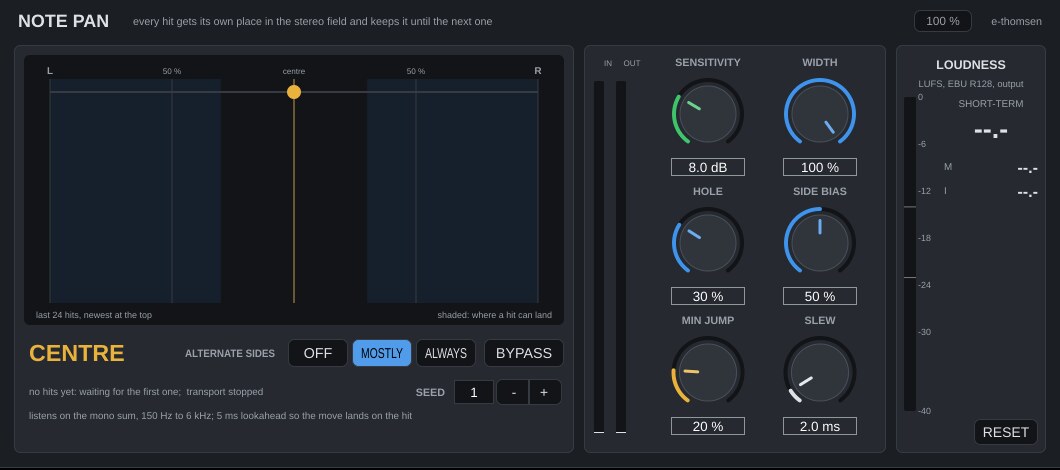
Where it goes
On a track with a clear attack: plucks, mallets, percussion, staccato keys, vocal chops. A mono source is panned; a stereo source is balanced as a whole. The audio runs 5 ms late, reported to Logic, so the move lands on the hit and not after it.
Controls
| Control | What it does |
|---|---|
| Sensitivity | 3 to 20 dB, default 8. How much louder than the last 50 ms a hit has to be to count. Lower catches ghost notes, higher only the accents. One hit is one draw, never more. |
| Width | 0 to 100 %, default 100. Scales every position. 50 % keeps everything within half left to half right. |
| Hole | 0 to 100 %, default 30. Nothing lands closer to the centre than this. The lane shows the reachable zone shaded. |
| Side bias | 0 to 100 %, default 50. 0 spreads the draws evenly between the hole and the edge, 100 piles them at the edges. |
| Alternate | Off, Mostly or Always, default Mostly. Mostly puts 80 % of the hits on the other side from the previous one, Always every hit. |
| Min jump | 0 to 100 %, default 20. A draw closer than this to the previous position is thrown away and drawn again. |
| Slew | 0.5 to 20 ms, default 2. The time the pan takes to move. 2 ms is inaudible as a move and does not click; 20 ms is a short slide into the new place. |
| SEED | 1 to 999, default 1. Which set of positions the song gets. With the transport running, each hit's position comes from the seed and where the hit sits in the song, so every playback and the bounce give the same pans. Another seed gives another set. |
| BYPASS | Everything returns to the centre. A plain bypass, since a pan does not change loudness. The latency stays, so the track keeps its alignment. |
The display
A lane from left to right. The amber marker is the current position, the dots are the last 24 hits (newest at the top, fading with age), and the shaded zone is where hits can land. Below it, the hit counter and where the last hit landed. The loudness panel measures the output.
Working with it
- Insert it on the track, play the part and watch the dots.
- If the lane shows hits you do not hear as hits, raise Sensitivity. If accents after a loud hit are missed, lower it.
- Set Hole to keep the centre free for the lead, and Width to decide how far out the part lives.
- For a figure that should ping-pong, use Always and a large Hole. For a looser spread, Mostly and a smaller Hole.
- If you do not like how a passage falls, try another SEED.
Under the hood
The detector listens to the mono sum, band-limited to 150 Hz to 6 kHz so sub and kick bleed do not trigger it, and compares a 1 ms envelope with a 50 ms one. With the transport running, each hit's random numbers come from the seed and the hit's song position in 1/64 notes. When playback starts somewhere in the song, the plugin takes the previous hit from what it remembers of the last playback, so playing from bar 33 continues as a playback from the start does. If it has not played that part since it was loaded, the first hit can land on the other side; with Mostly it falls back in step within a few hits, with Always it stays mirrored until the plugin has played from the start once.
The pan law is constant power, with unity at the centre: the power of a panned mono signal equals the input power, and each side peaks at most 3 dB above the input when hard-panned.