Colour
Manual · version 0.2
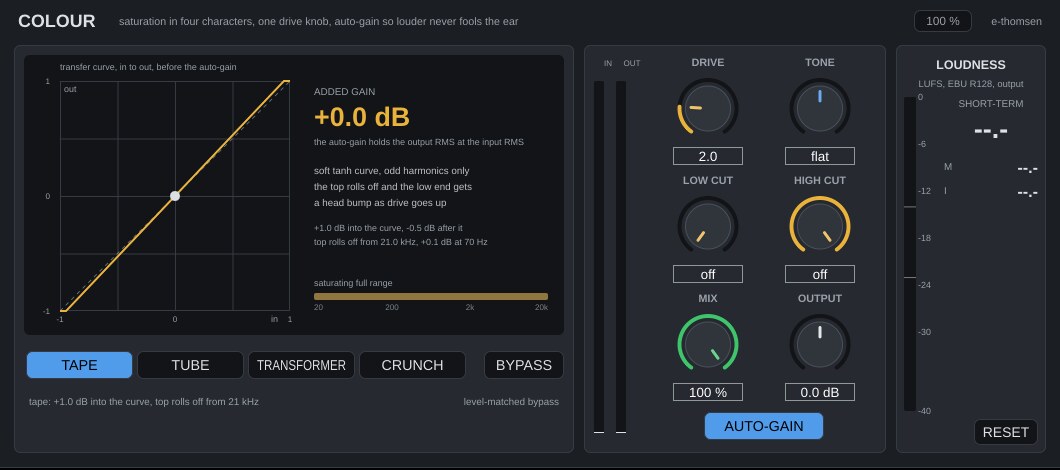
Saturation in four characters with one drive knob. The auto-gain holds the output at the level of the input, so turning drive up changes the sound while the loudness stays put. Low cut and high cut limit the saturation to a frequency range and let the rest pass clean.
Where it goes
On vocals, bass, drums or the mix bus. The curve runs at 2x oversampling, which costs 31 samples of latency, reported to Logic so it lines up.
Controls
| Control | What it does |
|---|---|
| TAPE | Default character. A soft curve with odd harmonics. As drive goes up the top rolls off (from 22 kHz at drive 0 to 7 kHz at drive 10) and the low end gets a head bump of up to +2.5 dB at 70 Hz. |
| TUBE | The signal sits on the bend of the curve, so the even harmonics lead. How far up the bend grows with drive, and one side clips sooner than the other. |
| TRANSFORMER | Only the band below 300 Hz saturates, with odd harmonics; the rest passes untouched and the two halves sum phase-correct. |
| CRUNCH | A clipper with a 3 dB soft knee, wideband, the hardest of the four. For drums and parallel crush. |
| Drive | 0 to 10, default 2. The only sound control. It sets the gain into the curve and how hard the curve bends, on a squared law so the first half of the knob is gentle: drive 2 is +1 dB into the curve, 5 is +6 dB, 7 is +11.8 dB, 10 is +24 dB. At 0 the output is the input, bit for bit, 31 samples late. |
| LOW CUT | 20 Hz to 2 kHz, default off. Saturate only above this frequency; below it the signal passes clean. For keeping the sub of a bass or a kick clean. |
| HIGH CUT | 1 kHz to 20 kHz, default off. Saturate only below this frequency; above it the signal passes clean. For keeping the top of a vocal or cymbals clean. |
| Tone | -100 (dark) to +100 (bright), default flat. A tilt around 800 Hz after the curve, ±6 dB at the ends of the band. |
| Mix | 0 to 100 %, default 100. Parallel blend. The dry path is delay-compensated, so 50 % at drive 0 is still the input. |
| AUTO-GAIN | On by default. Brings the saturated signal back to the input level (RMS over 300 ms, within ±18 dB). The large number shows what it added. Off, drive changes the level the usual way. |
| Output | -12 to +12 dB, default 0, after the mix. |
| BYPASS | Level-matched. When engaged, the input plays at the loudness the output had just before (capped at 20 dB, 25 ms fade), and the label shows the match. |
The display
The transfer curve of the current character and drive, input against output before the auto-gain, with unity dashed. The level of the saturated band sits on it as a dot, so you can see where the signal is on the bend. For Transformer the curve is that of the low band. A strip under the text shows the saturated range on a 20 Hz to 20 kHz scale, for example "saturating 180 Hz to 20 kHz, the rest clean".
Working with it
- Insert, pick a character, turn Drive up until it is too much, and back off a little. The level does not move, so what you hear is the colour.
- Tape on a vocal or the mix bus for weight and a softer top. Tube on a vocal or a bass for second-harmonic warmth. Transformer on a bass or a kick to thicken the bottom without touching the top. Crunch on drums, usually at 30 to 50 % Mix.
- If the sub of a bass gets woolly, bring LOW CUT up to 80 to 150 Hz. If a vocal gets fizzy on top, bring HIGH CUT down to 5 to 8 kHz.
- Use Tone to take back what the curve added, or to add bite.
- Check the match label and the loudness panel when you compare with BYPASS.
Under the hood
With a cut engaged, the input is split by Linkwitz-Riley crossovers. The band between the cuts goes to the curve; the bands outside it are delayed by the oversampler latency and added back, so the three sum flat. The curve runs at twice the sample rate behind a 63-tap half-band filter. All curves have unity slope at the origin, so quiet passages pass clean and drive is what pushes the signal into the bend. Changing the character crossfades over 20 ms, so it does not click.
Limits: the auto-gain is RMS, not loudness, so on a signal with a lot of top the saturated output can read a little louder in LUFS than the input. At high drive a loud tone near the top of the band can fold harmonics back into the audible range (Crunch on a 15 kHz sine at -20 dBFS leaves an alias at 9 kHz around -51 dB). A HIGH CUT below the problem frequency removes it; real programme material has far less energy up there.