Punch
Manual · version 0.2
A transient designer: more or less attack, more or less sustain, independent of how loud the source is. Two knobs do the work; Speed and Focus set what they listen to. Zero latency.
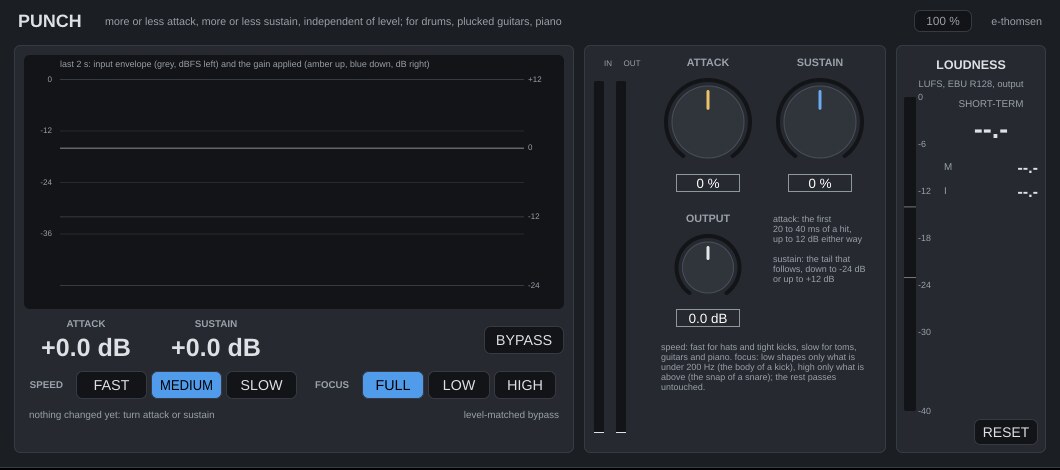
Where it goes
On a kick, a snare, the drum bus, plucked guitars or piano. Because every gain comes from the shape of the hit and not its level, the same hit is shaped the same way at -24 dBFS as at 0 dBFS, so it does not matter how hot the track arrives.
Controls
| Control | What it does |
|---|---|
| Attack | -100 to +100 %, default 0. The start of every hit, roughly its first 20 to 40 ms. +100 adds up to 12 dB there, -100 takes up to 12 dB away. The boost is strongest in the first few milliseconds and fades as the hit settles, so it reads as a harder or softer stick, not as a louder note. |
| Sustain | -100 to +100 %, default 0. The tail that follows a hit. -100 cuts it by up to 24 dB, +100 lifts it by up to 12 dB. The first 5 ms are never touched. It acts on the part of a decay that falls faster than about 200 ms (400 ms at Slow); a note that rings on evenly is left alone. |
| Speed | Fast, Medium or Slow, default Medium. How long attack and tail are. Fast halves the detector times (hats, tight kicks, 16th-note parts), Slow doubles them (toms, guitars, piano). At +100, 25 ms into a hit the boost is 0.5 dB at Fast, 3.5 dB at Medium and 7.5 dB at Slow. |
| Focus | Full, Low or High, default Full. Low: only what is under 200 Hz is detected and shaped, the body of a kick, and the top passes untouched. High: only what is above 200 Hz, the snap of a snare or the pick of a guitar, and the low end passes. The two bands sum flat. Changing Focus while audio plays crossfades over 20 ms, so it does not click. |
| Output | -12 to +12 dB, default 0. Trim after the shaping. |
| BYPASS | Level-matched. Shaping changes the loudness, so when engaged the input plays at the loudness the output had just before, and the label shows the match applied (capped at 20 dB, 25 ms fade). |
The display
The last two seconds: the detector envelope in grey (dBFS, scale on the left) and the gain applied on top, amber above 0 dB and blue below (scale on the right), in 5 ms steps so single hits are visible. The two large numbers are the attack gain and the sustain gain of the most recent hit; they hold for a moment and fall back.
Working with it
- On a kick, turn Attack up until the beater comes through the mix, then Sustain down until the kick gets out of the way of the bass.
- On a snare, Attack up for crack. Sustain up for a bigger room without reaching for a reverb, Sustain down to tighten a snare that rings.
- On a drum bus, the same in smaller amounts: 20 to 30 % goes a long way.
- On guitars and piano, use Slow and High focus: the pick or hammer gets more or less bite while the sustain of the strings is untouched.
- Check with BYPASS at matched level. If the processed version is only louder, back off.
Under the hood
The detector is the mono sum of the input or of the focused band, run through a 12 ms sliding peak window, which keeps a 40 Hz kick from modulating its own gain. Three envelope followers read that window. The attack gain is how far the fast envelope sits above the slow one, the sustain gain how far the fast envelope has fallen below the sustain follower; both are scaled by the knobs, added in dB and smoothed over 1 ms. For Low and High the gain goes on one band of a Linkwitz-Riley split while the other band passes.
Limits: a quiet note within about 200 ms after a loud one is read as part of the loud note's decay, so strong sustain cuts take ghost notes down too; use Fast or less sustain. Sustain cannot lengthen or shorten a note that already sustains evenly, such as an organ or a held pad.